CONNECTOR PRESET
D-sub 9
9 pins · female
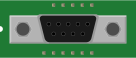
Connector definition
The D-sub preset has nine electrical pins. Mounting hardware and shell details in the SVG are artwork, not extra electrical positions. If you need a shell or shield connection, add an explicit pin ID and wire it deliberately.
| Positions | 9 |
|---|---|
| Pin IDs | 1, 2, 3, 4, 5, 6, 7, 8, 9 |
| Illustration | Local SVG, embedded in compatible exports |
YAML preset
This defines a connector named X1 and displays it as a standalone component. Add a cable and connection set to build a harness.
db9.yml
metadata:
  title: D-sub 9 connector
connectors:
  X1:
    type: D-sub 9
    pins:
      - 1
      - 2
      - 3
      - 4
      - 5
      - 6
      - 7
      - 8
      - 9
    image:
      src: library/connectors/db9.svg
      width: 100
connections:
  - - X1
Using this connector
- Open the preset in the editor, or drag it from the Components library into an existing drawing.
- Select the connector and expand Pinout to add the signal label and optional color for each position.
- Add a cable, set its conductor count, then connect the required pins to its wires.
- Review the official WireViz preview and bill of materials before downloading.
Read the full connector syntax or start with a complete harness example. The library keeps artwork attribution and license information with the original files.